
Bollinger Bands1.1.0 - App Store
You'll be able to see results in few seconds.
Publisher Description
Welcome Technical Analyst!
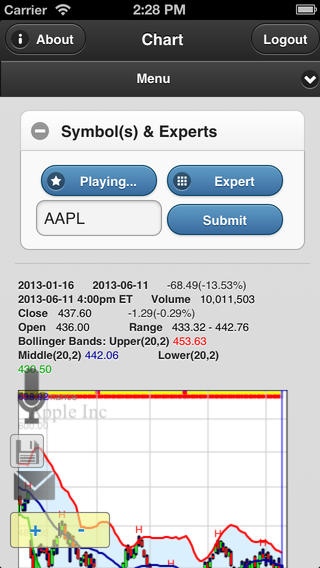
The Bollinger Bands application combines the most popular charting and screening features from our websites customized for a mobile touch-based screen. This is no stripped down mobile app; our Bollinger Band app provides features you would expect from the most sophisticated financial software. We think you ll agree that it offers the best of the web, PC and mobile world.
We offer fully interactive touch-based technical charts (touch drag, pinch zoom) with dynamic trackers, streaming data, deep price histories and more than 50 technical indicators / overlays / stops and much more:
Your choice of candlestick, Bollinger Bar, traditional bar, or line charts
VOICE COMMAND to modify the chart display, range, or add/remove indicators and settings
AUDIO expert technical analysis of chart patterns for easy listening, or text if you prefer to read
M & W pattern analysis
Industry group and market sector reports
Email snapshots of the currently displayed chart and indicators
A portfolio section to track your favorite stocks
Interactive touch based price chart TrendLines
Custom stops/system parameters for your favorite stocks
Indicator List:
Bollinger Band suite of indicators including Percent b (%b) and BandWidth
Simple and Exponential moving averages
Bollinger Price Magnets, Hips/Lops, Zig Zags
Volume Indicators/Oscillators (Accumulation Distribution, Intraday Intensity, On Balance Volume, Price Volume Trend, Money Flow Index...)
MACD, Comparative Relative Strength, DMI, Momentum, Rate of Change, RSI, Stochastics %k %d, Williams %R, Average True Range, Alphier Indicators, etc...
Parabolic and Chandelier Stops/Systems
Custom screening for stocks based on advanced technical analysis options:
Last price, price change, average volume, P/E, capitalization
Bollinger Bands: %b, Bandwidth and The Squeeze!
Money Flow Index, RSI, Accumulation Distribution, Intraday Intensity, Momentum, VWMACD and Moving Averages
Prescreened lists based on:
Daily lists of the four Bollinger methods (Volatility Breakout, Trend Following, Reversals, Confirmed Breakout)
Daily Pivot and Powershift signals
Top-rated stocks based on EquityTrader performance and potential ratings
Daily list of stocks forming W-bottoms
Most frequently requested stocks
52 Week highs and lows
Daily top gainers and losers
Daily most actively traded stocks
And much, much more!
We think you will be very pleased with the charts and analysis provided for free. And for the most powerful analysis, additional advanced features of the application are available to current Bollinger website subscribers.
Thank you for trying the Bollinger Bands application! We look forward to your feedback.
Requires iOS 5.0 or later. Compatible with iPhone, iPad, and iPod touch.
About Bollinger Bands
The company that develops Bollinger Bands is Bollinger Capital Management, Inc.. The latest version released by its developer is 1.1.0.
To install Bollinger Bands on your iOS device, just click the green Continue To App button above to start the installation process. The app is listed on our website since 2013-08-28 and was downloaded 0 times. We have already checked if the download link is safe, however for your own protection we recommend that you scan the downloaded app with your antivirus. Your antivirus may detect the Bollinger Bands as malware if the download link is broken.
How to install Bollinger Bands on your iOS device:
- Click on the Continue To App button on our website. This will redirect you to the App Store.
- Once the Bollinger Bands is shown in the iTunes listing of your iOS device, you can start its download and installation. Tap on the GET button to the right of the app to start downloading it.
- If you are not logged-in the iOS appstore app, you'll be prompted for your your Apple ID and/or password.
- After Bollinger Bands is downloaded, you'll see an INSTALL button to the right. Tap on it to start the actual installation of the iOS app.
- Once installation is finished you can tap on the OPEN button to start it. Its icon will also be added to your device home screen.
Program Details
System requirements
Download information
Pricing
Version History
version 1.1.0
posted on 2013-08-28
Disclaimer
Official App Store Link
We do not host Bollinger Bands on our servers. We did not scan it for viruses, adware, spyware or other type of malware. This app is hosted by Apple and passed their terms and conditions to be listed there. We recommend caution when installing it.
The App Store link for Bollinger Bands is provided to you by apps112.com without any warranties, representations or guarantees of any kind, so access it at your own risk.
If you have questions regarding this particular app contact the publisher directly. For questions about the functionalities of apps112.com contact us.
